

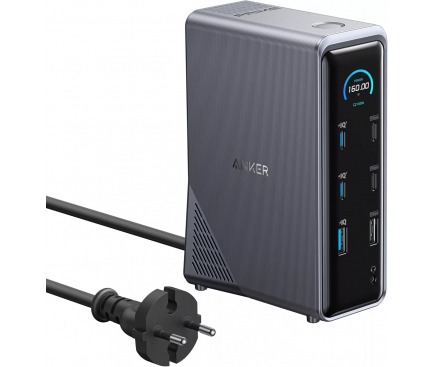
Anker 737 Charging Station Becoming Most Popular Desk Charging Hub Available
A clean work surface changes how a day feels. Fewer loose bricks, fewer mystery cables, fewer half-charged devices sitting near the edge of the table. That is why a desk charging hub earns attention from remote workers, students, creators, and everyday laptop users who want one tidy power point instead of a crowded wall outlet. The Anker charging station fits that moment well because it blends AC outlets, USB-C, and USB-A into one slim desktop unit. Readers who track tech trends through a trusted product coverage network will spot the same pattern across U.S. home offices: people are not buying chargers only for speed anymore. They are buying order. Anker’s current official listing for the Prime 6-in-1 Charging Station identifies model A9128 as a 140W, GaNPrime-powered, space-saving power strip, while major retail listings show the familiar 2 AC, 2 USB-C, and 2 USB-A layout buyers want for mixed devices.
Why the Desk Charging Hub Format Fits Modern Work
The old charging routine was built around one device at a time. A phone went on one brick, a laptop took over the wall outlet, earbuds waited, and the tablet got charged overnight because nothing else was open. That setup made sense when most people had fewer daily electronics. It feels clumsy now. The modern desk has a laptop, phone, watch charger, lamp, earbuds, tablet, camera battery, and maybe a small speaker. A flat desktop power unit does not feel fancy. It feels overdue.
The quiet problem with wall chargers
Big wall chargers can be fast, but they are not always pleasant. Many high-power GaN chargers are heavy enough that their weight can make them feel loose in older outlets, especially behind desks where the plug angle is poor. The Verge covered Anker’s later Prime wall charger redesign and noted that center of gravity and prong grip were part of the fix for wall-charger sag. That detail says something plain: power is not the only issue. Placement matters.
A corded station avoids part of that fight. The weight sits on the desk, not on the wall. You can place it beside a monitor stand, under a laptop riser, or near the back corner where cables naturally gather. That sounds small until you stop crawling under the table to swap plugs.
There is a non-obvious comfort here too. A visible power point can make you charge less chaotically. When every cable has a known home, you stop keeping extras plugged into random outlets across the room. The setup gets calmer because the choice is simple.
Why one central charger feels faster than it is
Speed is not only wattage. It is also the time you lose finding the right brick, the right cable, and the open outlet. A USB-C power strip near your keyboard can save more daily friction than a slightly faster single-port charger buried behind furniture.
A U.S. remote worker with a MacBook Air, iPhone, AirPods, and a small desk lamp may not need a giant power tower. They need one place where the laptop can sip high power, the phone can top off during a call, and the earbuds can recover before a commute. That is where this Anker charging station feels practical. It meets the day where the mess starts.
The counterintuitive part is that a charging station can make a desk look less “techy.” When the power hardware is contained, the rest of the workspace gets quieter. You notice the notebook, the coffee, the monitor. Not the cable nest.
The Port Mix That Makes the Anker Charging Station Feel Practical
A good desk charger is not the one with the most ports on a spec sheet. It is the one with the right mix of ports for devices people still own. USB-C is the future, but plenty of homes still have USB-A cables for watches, older headphones, keyboards, fans, bike lights, and car accessories. AC outlets still matter too. Some desk gear will never charge from USB. That mix is why the Anker 737 style of station keeps showing up in shopping carts.
Two AC outlets still matter
The 6-in-1 version listed by major U.S. retailers includes two AC outlets, two USB-C ports, and two USB-A ports, plus a detachable 5-foot extension cord. Retail data also shows strong buyer interest, with a 4.6-star rating count in the thousands and “1K+ bought” shown for the past month at the time indexed. Treat those numbers as retail signals, not proof that any product is the single market leader. Still, they explain why this format keeps getting attention.
Those AC outlets are useful for the items people forget when comparing chargers: a monitor light bar, a label printer, a small desk fan, a speaker dock, or a camera battery charger. USB-C cannot replace every plug on your desk yet. For many people, the AC side is the reason this feels like a power station rather than another phone charger.
A common example is a college apartment desk. The student may have a laptop, phone, desk lamp, and old USB-A cable for headphones. A compact strip handles all four without taking over the floor. That matters in a shared room where every square inch gets judged.
USB-A is not dead yet
USB-A looks old until you need it. Plenty of affordable accessories still ship with USB-A cables, and many households have drawers full of working cables they do not want to toss. A GaN charging station that includes USB-A gives those devices a place without wasting the high-power USB-C ports.
This is where “future-ready” can become a trap. A charger with only USB-C may look cleaner on paper, but it can force people to buy extra cables before they see the benefit. The better design accepts the transition period. Most U.S. homes are not moving from old to new in one neat step.
For readers building a full work zone, this is also where home office desk setup ideas can pair well with charging choices. Cable clips, a monitor shelf, and one power point can do more for daily focus than another decorative gadget.
What 140W USB-C Power Changes at a Real Desk
High wattage gets tossed around like a trophy, but the real question is simple: what can you charge without thinking about it? Anker’s official page positions the Prime 6-in-1 as a 140W power strip powered by GaNPrime, while USB-IF explains that USB Power Delivery can reach higher power levels through newer voltage options, including 28V for up to 140W. That makes the spec more than a marketing number when paired with devices and cables that support it.
Where a GaN charging station helps most
GaN matters because it helps chargers handle higher output in a smaller body than older designs. The user does not need to care about the chemistry lesson. The benefit is easier to feel: less bulk, less desk sprawl, and enough output for demanding USB-C gear.
A 140W ceiling is most useful for laptop-first desks. Think MacBook Pro users, creators moving files from cameras, consultants who live on video calls, or students with a laptop and tablet open all day. Even when the laptop does not pull the full amount, having headroom helps the charger divide power across devices without feeling strained.
The non-obvious catch is cable quality. A high-output port cannot turn a weak cable into a high-power cable. For 140W-class charging, the cable and device must support the right USB-C power level. A buyer who ignores the cable may blame the charger for slow charging that comes from the cord.
Shared power is the real feature
Single-port speed looks great in a product photo. Shared power is what you live with. When a laptop, phone, and earbuds are plugged in together, the station has to split output in a way that keeps the main device moving while still feeding the rest.
That is why a USB-C power strip can feel better than three separate adapters. The setup has one power source, one cord to the wall, and one place to check. You still need to understand that plugging in more devices can reduce the power each one gets. That is normal. It is not a flaw.
For travel-heavy laptop users, a separate portable laptop charger guide can help decide whether a desktop unit should be paired with a power bank. A station handles the desk. A battery handles the airport, the car, and the coffee shop.
Who Should Buy It, Skip It, or Wait for a Deal
The best buyer for this kind of charger is not the person chasing every new accessory. It is the person tired of small daily annoyances. If your laptop cable crosses your mouse pad, your phone charger steals the only open wall plug, and your earbuds are always dead before you leave, the value is easy to feel. If your desk already has a neat power strip under it and one USB-C brick does the job, this may be more of a comfort upgrade than a need.
Best fit for home offices and small desks
This charger fits home offices where the desk is also a command center. Remote workers often bounce between a laptop, phone, earbuds, and tablet during the same day. Parents may share the desk with a child’s school Chromebook in the evening. A compact station lets that shared area reset faster.
It also makes sense for renters. Many U.S. apartments have awkward outlet placement, older wall plates, or limited plugs near a desk. A single cord from the wall to the desktop can be easier to manage than a floor strip collecting dust near your feet.
The surprise benefit is habit change. Once charging gets easier, people tend to return devices to the same place. That can reduce lost cables and low-battery panic before leaving the house. Organization often starts with removing one tiny excuse.
When another charger makes more sense
Skip this type of Anker charging station if you need many AC outlets for a full desktop PC setup, large speakers, multiple monitors, and powered accessories. Two AC outlets can disappear fast. In that case, a larger surge protector under the desk plus a separate USB-C charger may be the cleaner answer.
Also skip it if you need wireless charging built in. This model type is about wired power, not a MagSafe-style stand. If you want your iPhone upright during calls, a 3-in-1 wireless stand may suit you better, though it will not replace AC outlets.
Deal timing matters too. Charging gear often sees discounts during Prime Day, back-to-school sales, Black Friday, and spring tech promotions. The Verge noted broad charger discounts during Amazon’s 2026 Big Spring Sale, including Anker and other power accessories. That does not guarantee the same discount later, but it supports a smart rule: buy now if the cable mess is costing you daily patience; wait if your current setup is fine.
Conclusion
The appeal of this Anker model is not hard to understand once you stop judging it like a simple charger. It is a small desk decision that changes how often you bend down, swap bricks, hunt cables, or ration outlets. That is why the desk charging hub idea has become so sticky for home offices, dorm rooms, and apartment work corners. The Anker 737 name may sit beside newer Prime branding in different listings, but the reason people keep searching is plain: they want one compact place to power the devices they use every day. The smartest buyer will check the exact model, port count, cable needs, and current price before ordering. Do that, and this kind of station can become one of those quiet upgrades you stop noticing because it works. Start with the messiest part of your desk, then decide whether one cleaner power point can fix it.
Frequently Asked Questions
Is the Anker 737 Charging Station worth buying for a home office?
Yes, it can be worth buying if your desk has several wired devices and limited outlet space. It works best for laptop users who also charge a phone, earbuds, tablet, lamp, or small accessory from the same work area.
How many devices can the Anker Prime 6-in-1 Charging Station charge?
The 6-in-1 model supports up to six connected items through two AC outlets, two USB-C ports, and two USB-A ports. Real charging speed depends on the devices attached, cable quality, and how the available power is shared.
Can it charge a MacBook Pro at full speed?
It can support high-power USB-C charging when the laptop, cable, and port conditions match the required power level. Some MacBook Pro models may need specific cables or adapters to reach their fastest supported rate, so check your laptop’s charging specs.
Does the charger support older USB-A cables?
Yes, the mixed-port layout includes USB-A ports for older accessories and cables. That helps with headphones, fitness devices, keyboards, small fans, and older charging cords that still work fine but do not use USB-C.
Is a GaN charging station safer than a normal power strip?
GaN alone does not make a charger safe. Safety comes from the full design, heat handling, protection systems, certifications, and proper use. Buy from a trusted seller, avoid damaged cables, and never overload AC outlets beyond their rated limits.
Can I travel with the Anker Prime 6-in-1 Charging Station?
It can work for travel, especially road trips, hotels, and shared rentals, but it is better viewed as a compact power strip than a pocket charger. For flights or everyday bags, a smaller wall charger may feel easier to carry.
Does it replace a surge protector?
Not always. Some charging stations focus on power delivery and outlet access, while surge protectors focus on guarding equipment from voltage spikes. Check the exact product listing before using it with costly monitors, desktops, or audio gear.
What should I check before buying this charger?
Check the exact model number, total wattage, AC outlet count, USB-C output, cord length, return policy, and seller. Also confirm whether your main laptop cable supports high-watt USB-C charging, since a weak cable can limit performance.