

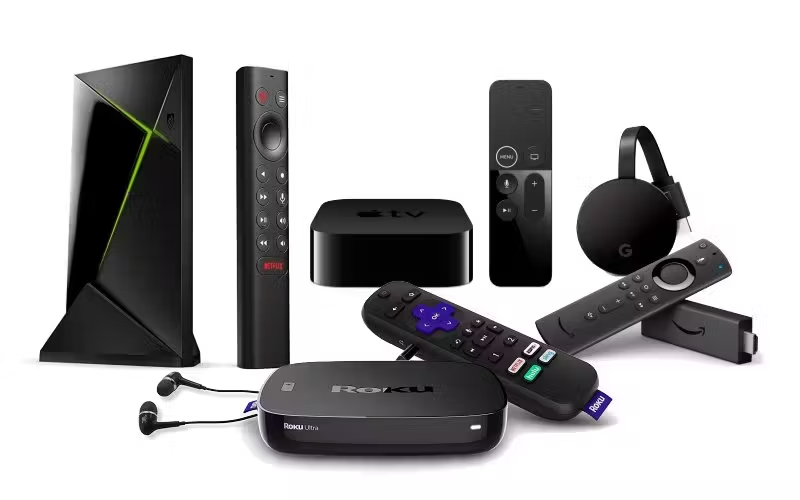
Streaming Device Guide for Better Home Viewing
A living room can feel modern and still make movie night harder than it needs to be. The wrong box, stick, remote, or app layout can turn a simple plan into ten minutes of password resets and menu hunting. A smart Streaming Device Guide helps you think less about shiny features and more about how your household actually watches TV in the United States. Families want live sports without delay, renters want easy setup, parents want simple controls, and cord-cutters want fewer monthly surprises. Good home entertainment choices rarely come from buying the most expensive gadget on the shelf. They come from matching the device to the screen, the Wi-Fi, the people using it, and the services already paid for. For readers comparing media habits, tech purchases, and digital lifestyle choices, consumer-focused media planning can help frame these decisions in a broader way. The best streaming setup does not shout for attention. It disappears into the background so the show, game, or film can take over.
Streaming Device Guide Choices Start With Your Real Viewing Habits
Most people shop backward. They start with the device, then try to force their habits into whatever interface comes with it. Better buying starts at the couch, not the electronics aisle. A retired couple in Arizona watching cable-style news has different needs from college roommates in Ohio jumping between YouTube, sports apps, and shared subscriptions. The device should serve the pattern already happening in the room.
Match the Device to the People Holding the Remote
A household with one careful viewer can handle deeper menus and advanced settings. A home with kids, grandparents, guests, and tired parents needs a remote that makes sense in half a second. That difference matters more than processor speed.
Voice search sounds like a bonus until someone with limited typing patience uses it every evening. A clean home screen sounds boring until your family stops asking where the app went. The best device is often the one that reduces small annoyances, because small annoyances repeat.
Shared homes need even more care. A single profile can turn recommendations into a messy pile of cartoons, crime shows, fitness videos, and sports clips. Devices that support clear profiles help each person find their own rhythm without wrecking everyone else’s suggestions.
Think About Services Before Screens
Streaming apps shape the device decision more than hardware specs do. A household built around Netflix, Hulu, Disney+, Max, Peacock, and Prime Video needs broad app support, quick switching, and stable updates. A sports-heavy household needs live TV services, league apps, and strong Wi-Fi behavior during peak hours.
Cable replacements add another layer. YouTube TV, Hulu + Live TV, Sling TV, and similar services feel better on devices that make channel browsing less clumsy. Nobody wants to treat live television like a scavenger hunt.
Free ad-supported apps also deserve attention. Pluto TV, Tubi, The Roku Channel, and Freevee can reduce paid subscriptions for many American homes. A device that makes free content easy to find can save more money over a year than a discount on the hardware itself.
Picture, Sound, and Wi-Fi Matter More Than Fancy Menus
A streaming device can only perform as well as the room allows. The television, internet connection, HDMI port, router placement, and sound system all shape the final experience. Buying a premium player for a weak Wi-Fi corner is like putting racing tires on a shopping cart. The parts have to work together.
4K Streaming Setup Decisions Need Honest Limits
A 4K TV does not guarantee a sharp picture. The app must offer 4K content, the subscription plan must include it, the HDMI connection must support it, and the internet speed must keep up. One weak link can pull the whole picture down.
Many households pay for high-resolution plans without noticing that their favorite shows stream in HD most of the time. That does not mean 4K is a waste. It means you should buy for the content you watch most, not the badge printed on the box.
HDR creates another trap. Dolby Vision, HDR10, and HDR10+ can make a picture richer, but only when the TV and content support the same format. A midrange device paired with a midrange TV often looks excellent when the settings are right. A pricey device with careless settings can look flat.
Better Home Viewing Depends on Network Stability
Wi-Fi problems often get blamed on the streaming box. In many homes, the real villain sits behind a couch, inside a cabinet, or at the far end of the house. Streaming needs a steady signal more than a heroic peak speed.
A family watching live football in Texas on Sunday afternoon may notice buffering at the worst possible time. That moment is rarely about the app alone. Multiple phones, laptops, tablets, smart cameras, and game consoles may be pulling from the same router.
Ethernet still wins when available. A wired connection can make a living room device feel calmer, especially for live sports and 4K movies. When wiring is not possible, moving the router, adding a mesh node, or choosing a device with stronger Wi-Fi support can change the entire room.
Platform Comfort Can Beat Raw Power
A fast processor helps, but the interface decides whether people enjoy using the device. Some platforms push their own content harder. Others keep app rows cleaner. Some remotes feel friendly. Others seem designed by someone who never watched TV half-asleep. Comfort matters because streaming is not a one-time task. You repeat the same actions every night.
Smart TV Apps Are Convenient but Not Always Enough
Built-in TV apps feel like the cleanest solution because there is no extra hardware. For casual viewers, that may work fine. A newer smart TV from a major brand can handle popular apps without fuss, and one remote keeps the coffee table cleaner.
The trouble starts as the TV ages. App updates slow down, menus lag, and some services stop feeling as polished. A $30 to $60 external device can often make an older television feel new again without replacing the screen.
Privacy settings also deserve a real look. Smart TVs and streaming platforms may collect viewing data, voice search activity, and ad-related signals. Taking ten minutes to review settings after setup is not paranoia. It is normal household maintenance, like changing a smoke detector battery.
Voice Search and Remote Design Shape Daily Use
Remote design looks minor until the third lost remote of the month. Small sticks with tiny remotes can work for tidy adults, but family rooms need buttons people can find without staring. Volume, power, mute, and app navigation should feel natural.
Voice search helps when app catalogs become bloated. Saying a movie title should take you close to the right result instead of dumping you into a promotional maze. The best voice tools search across several services and show where the title is included with a subscription.
Shortcut buttons split opinion. Some people love them. Others hate paying for a remote that advertises services they do not use. A programmable button or clean app row gives more control, especially when subscriptions change during the year.
Cost Control Is the Hidden Skill in Streaming
The hardware price gets too much attention. The real cost sits in monthly subscriptions, rental fees, premium tiers, sports packages, and forgotten trials. A cheap device connected to six paid services is not a cheap setup. A smart buying plan looks past the checkout price and asks what the room will cost six months from now.
Budget Streaming Options Can Still Feel Premium
Affordable devices have improved enough that many homes do not need flagship hardware. A basic streaming stick can handle HD and 4K content well when the Wi-Fi is stable and the interface fits the household. Spending more should solve a clear problem, not scratch a vague fear of missing out.
A guest room, basement TV, or kids’ room rarely needs the most powerful player. Those spaces need reliability, easy controls, and access to the right apps. Save the stronger device for the main screen where picture quality, audio gear, and daily use matter more.
Sales can help, but bundles can mislead. A low device price tied to app promotions may encourage extra subscriptions. The smarter move is to list your must-have services first, then choose the hardware that supports them cleanly.
Cut Subscription Waste Before Buying New Hardware
Many streaming frustrations come from too many choices, not too few. Five paid apps can make the home screen look full while still leaving people unsure what to watch. That is not entertainment. That is clutter with a monthly bill.
Rotating subscriptions works well for many American households. Keep one or two core services, pause the rest, and bring them back when a favorite show, season, or sport returns. The device should make sign-ins and app management easy enough that rotating does not feel like punishment.
Annual plans deserve caution. They can save money for services you use every week, but they trap cash in apps that may sit untouched for months. Before paying yearly, check the last 30 days of actual viewing. The truth is usually sitting in your watch history.
Setup Choices Decide Whether the Device Feels Easy Later
A clean setup prevents future irritation. Too many people plug in the device, sign into apps, and stop there. That leaves display settings, privacy choices, remote pairing, app order, and parental controls unfinished. The first hour matters because it sets the tone for every night after.
Organize Apps Around Real Life, Not Brand Order
Default home screens often favor promoted services. Your layout should favor what your household opens most. Put daily apps first, occasional apps lower, and unused apps out of sight. A clean row beats a crowded menu every time.
Parents should separate kid-friendly apps and profiles from adult viewing. That reduces accidental purchases and keeps recommendations cleaner. It also helps children build habits around approved content instead of wandering through every tile on the screen.
Guests need simple access too. A short note near the TV with Wi-Fi details, device name, and basic instructions can save awkward troubleshooting. This matters in vacation rentals, spare rooms, and homes where relatives visit often.
Protect Accounts, Purchases, and Family Settings
Streaming devices connect to payment methods, viewing profiles, voice tools, and personal accounts. Treat them like household tech, not disposable gadgets. A device sold, gifted, or moved to another home should be factory reset first.
Purchase PINs are worth turning on. Accidental rentals, channel add-ons, and premium trials can appear fast when children or guests explore menus. A PIN adds a small pause before money leaves the account.
Parental controls work best when paired with conversation. Settings can block mature content, but they cannot explain taste, limits, or family rules. Use profiles and controls as guardrails, then review them as children get older and viewing habits change.
Conclusion
A better streaming setup does not come from chasing every new release. It comes from noticing how your home already behaves when people sit down to watch something. The remote, app layout, Wi-Fi strength, subscription mix, and screen settings all shape the experience long before a movie starts. A good Streaming Device Guide gives you permission to ignore features that sound impressive but do nothing for your room. Buy for the people using the device, the services they open, and the problems they complain about more than once. Start with your main TV, clean up the subscriptions, check the network, and set the device properly before judging it. Your next step is simple: audit one screen in your home tonight and remove every source of friction between the couch and the content you came to enjoy.
Frequently Asked Questions
What is the best streaming device for an American household?
The best choice depends on your apps, TV type, Wi-Fi strength, and comfort with the remote. Roku works well for simple navigation, Apple TV fits Apple-heavy homes, Fire TV suits Prime users, and Google TV helps viewers who search across many services.
How do I choose a streaming device for 4K TV?
Pick a device that supports 4K, HDR formats your TV can show, and the apps you use most. Check your subscription plan too, because some services charge more for 4K. A strong Wi-Fi signal or Ethernet connection matters as much as the device.
Are smart TV apps better than streaming sticks?
Smart TV apps are fine when the TV is new and responsive. Streaming sticks often age better because they get stronger app support and faster updates. If your TV menu feels slow, an external device can refresh the whole experience for less money.
Which streaming device is easiest for seniors to use?
A simple remote, clear home screen, and reliable voice search matter most. Roku devices often feel approachable because the layout is plain and the remote is easy to understand. The right answer is the one that reduces confusion during daily use.
Can a streaming device replace cable TV?
A streaming device can replace cable when paired with live TV services, network apps, sports packages, and free channels. The savings depend on which subscriptions you keep. Many homes cut cable successfully, but sports and local channels require extra planning.
Why does my streaming device keep buffering?
Buffering usually comes from weak Wi-Fi, network crowding, app issues, or internet speed dips. Move the router closer, restart the device, close unused apps, or use Ethernet when possible. Live sports and 4K video expose weak connections faster than regular HD shows.
How many streaming subscriptions should one home keep?
Most homes do better with two or three active paid services at a time. Keep the ones you watch weekly and pause the rest until specific shows return. Rotating subscriptions can lower bills without making the TV feel empty.
Do streaming devices collect viewing data?
Many platforms collect viewing, search, and ad-related data unless settings limit it. Review privacy options during setup, disable unwanted tracking where available, and reset devices before selling or gifting them. A few minutes in settings can protect more than you think.